Getting started with GraphQL
Overview
Follow these steps to connect Semarchy xDI to a GraphQL endpoint, describe the operations you want to run, and reuse them in mappings.
Create the GraphQL metadata
-
Right-click a folder in your project and select New > Metadata.
-
Pick GraphQL in the Create Metadata wizard and click Next.
-
Name your metadata and click Next.
-
In the Module Selection window, choose the GraphQL module.
-
Click Finish to create the metadata object. The editor opens.
Configure the GraphQL metadata
You can set the following properties in the metadata editor:
-
In the Standard finger tab, define the following information:
-
Endpoint URL: specify the HTTPS endpoint exposed by your GraphQL server. One metadata node equals one endpoint, so create additional nodes if you work with multiple environments.
-
HTTP Security: Find an existing HTTP security metadata object that has a bearer token configured, and select the bearer token.
-
Keystore and Truststore: optionally, configure certificates and keys for endpoints that require mutual TLS or custom certificate validation.
-
-
In the Advanced finger tab, adjust connect, response, read, and write timeouts that apply to every operation unless you override them in the mapping.
Add queries or mutations
Use the metadata tree to define each GraphQL operation you need:
-
Right-click the metadata node and choose New > Query.
-
Enter a Name and paste the GraphQL statement into Operation.
-
Under the query node, add a Response JSON node.
-
Under the Response node, define the JSON structure that matches the expected response. You can use the JSON Root Object Wizard or define the structure by hand.
-
Add more query nodes for every query or mutation you plan to invoke.
| GraphQL queries can use variables for dynamic values. Variables let you pass different parameters without modifying the query itself. See Query variables to define and use variables in your queries. |
Create mappings
Once the GraphQL metadata is ready, you can use it in mappings.
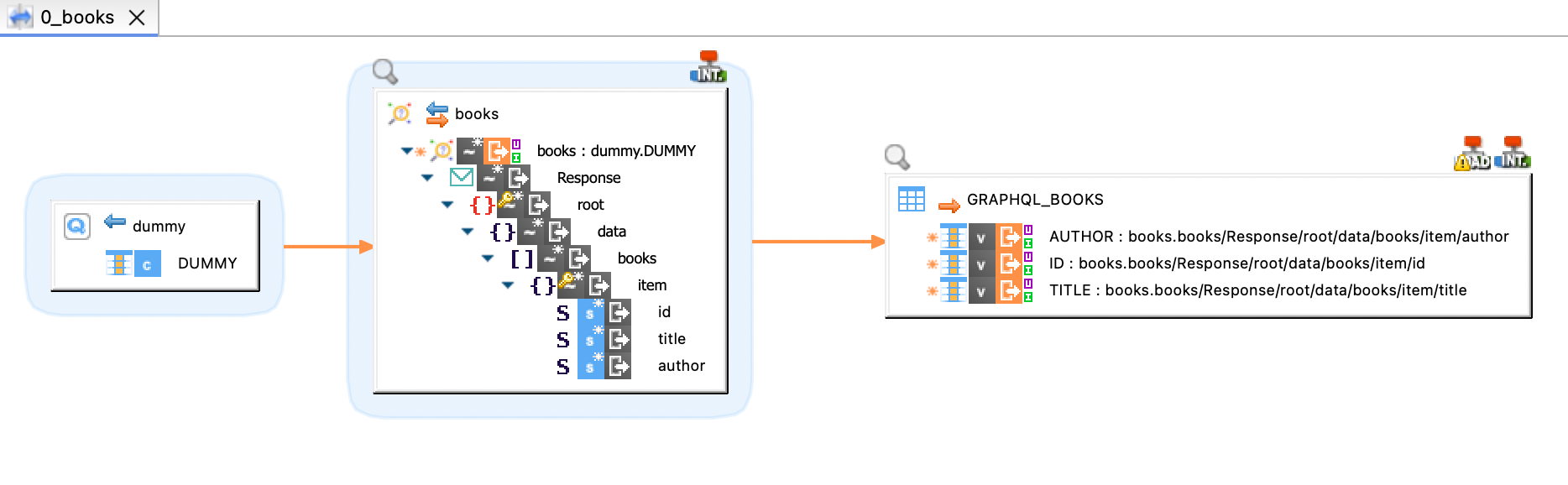
When using GraphQL metadata, make sure to map a database to the GraphQL root query node. This database acts as the source of records that triggers GraphQL operations, and defines how many times the query runs.
In the following mapping, a books query is sent to the endpoint defined in the metadata object it belongs to. Nodes from the Response data are mapped to the columns in the target table.
For more information, see Working with GraphQL.